
How to research prospects for cold email
Learn a fast, practical framework to research prospects, capture fit and intent signals, and turn findings into reusable outreach briefs.

If your cold email outreach feels like guesswork, the fix is not "more volume" but better inputs. When you research prospects with a repeatable method, you stop emailing "maybe" accounts and start targeting people with the right fit, the right timing, and the right context.
Key takeaways
Prospect research is not “finding emails” - it is validating fit, timing signals, and a concrete message angle you can use.
Use a 3-layer system: Fit (should we sell?), Intent (why now?), Context (what do we say?).
Turn findings into a reusable outreach brief with fields your team can standardize and QA in minutes.
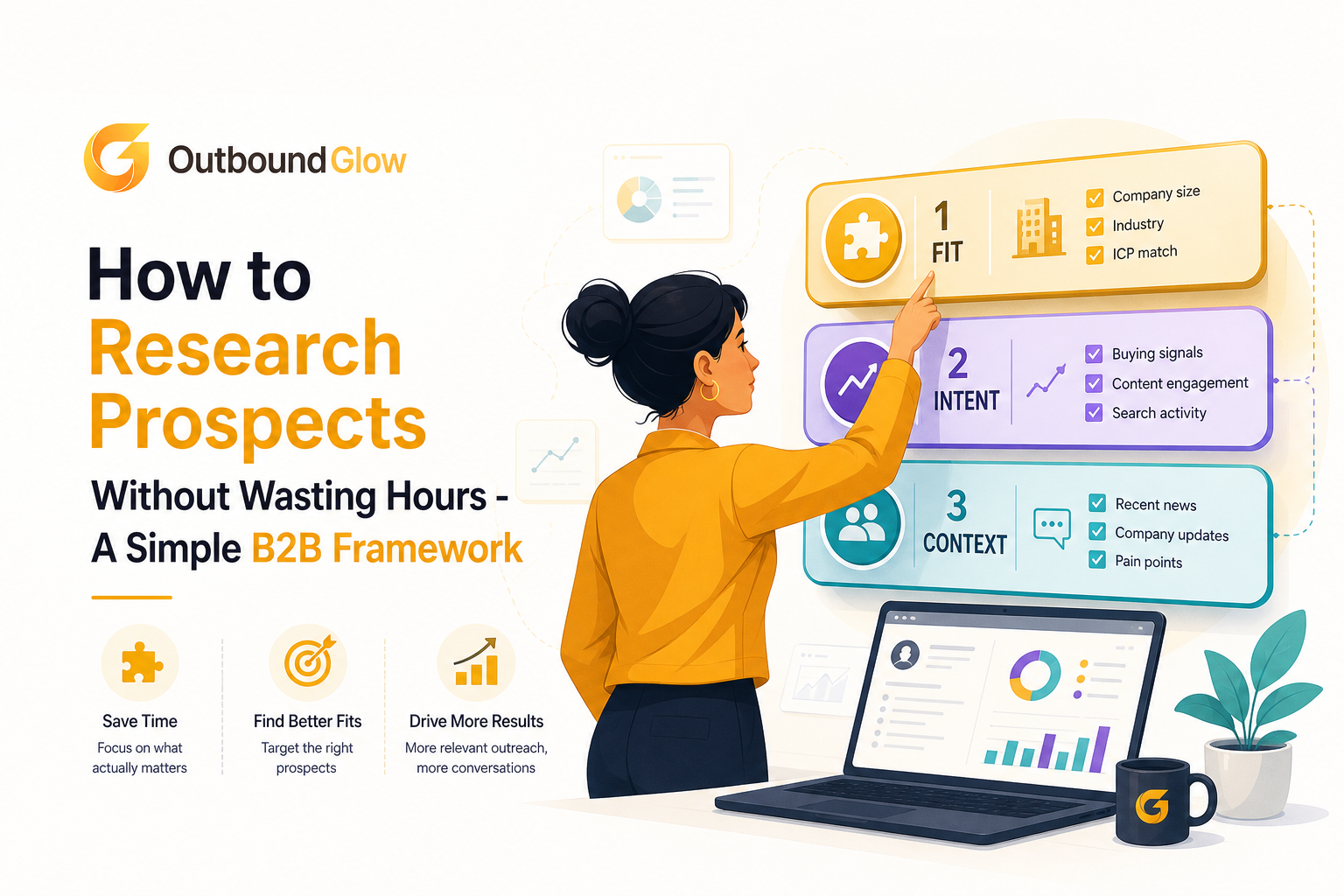
A simple three-layer model for prospect research: fit, intent, and context.
What It Means to Research Prospects for Cold Email and Why It Changes Reply Rates
Prospect research vs lead lists
A lead list answers: “Who exists in this category?” Prospect research answers: “Who is worth contacting now, and what should we say?”
In practice, researching prospects means you can fill three blanks before sending a first email:
Fit: Do they match your ideal customer profile (ICP) and constraints?
Intent: Is there evidence they might care right now (trigger, initiative, change)?
Context: What specific detail makes your outreach relevant and not generic?
The hidden cost of skipping research
When you do not research prospects, you pay for it in three places:
Deliverability: bad data increases bounces. High bounce rates can hurt sender reputation, and mailbox providers use engagement and complaint signals to decide inbox placement. If you want a practical breakdown, see bounce rate definition.
Opportunity cost: every email to a non-fit account is one you did not send to a real buyer.
Message quality: vague messaging forces prospects to do the work of understanding why you are relevant. Most will not.
Common mistakes that waste hours
Researching everything: reading five tabs per prospect instead of collecting the 3 to 6 data points that change your message.
Confusing personalization with relevance: a compliment about a podcast is not a business reason to reply.
Using “job title” as ICP: role alone is not fit. A VP Marketing at 20 employees and 2,000 employees buys differently.
Not capturing findings: research lives in someone’s head, so the team cannot reuse it or improve it.
A Simple 3-Layer Framework to Research Prospects Fast
Layer 1 - Fit signals (should we sell?)
Fit is your first filter. If fit is wrong, intent and personalization do not matter. Use a checklist with hard “yes/no” gates and a few “score” fields.
Fit checklist (copy/paste)
Industry: matches your best customers (yes/no)
Company size: employee range and complexity you can serve (yes/no)
Geo: supported regions, languages, legal constraints (yes/no)
Role: buyer or strong influencer (yes/no)
Tech environment: required stack or exclusions (score 0 to 2)
Budget proxy: funding, revenue band, hiring velocity (score 0 to 2)
What to look for (with fast sources)
Company website: product lines, target market, pricing page cues.
LinkedIn company page: headcount range, hiring, recent posts.
Job posts: tools mentioned, priorities, internal projects.
Tech signals: builtwith-style checks or “stack” mentions in postings (avoid deep dives, just confirm constraints).
Benchmark: For most B2B teams, fit research should take 60 to 120 seconds per account once your checklist is defined. If it takes 10 minutes, your checklist is too fuzzy.
Layer 2 - Intent and triggers (why now?)
Intent is the “timing” layer. You are looking for changes that create a reason to evaluate new tools, processes, or vendors. This is where researching prospects directly improves reply rates because it gives you a legitimate “why you, why now” hook.
Trigger library (pick 1 to 2 per prospect)
Hiring trigger: hiring for roles your solution supports (ex: SDR manager, RevOps, demand gen).
Growth trigger: funding, expansion to new market, new product line.
Systems trigger: CRM migration, new tooling, stack consolidation.
Leadership trigger: new VP, new director, org reshuffle.
Compliance or risk trigger: policy changes, deliverability issues, security requirements.
Competitive trigger: competitor launches or messaging shift.
Where to find triggers quickly
LinkedIn: job changes, hiring posts, company announcements.
Press releases and newsroom: product launches, partnerships.
Job boards: role descriptions reveal priorities and tools.
Regulatory or standards references: if relevant to your market. For email practices, mailbox guidance and industry docs can help frame risk. For example, Google has published sender guidelines for bulk emailers: Gmail sender guidelines.
Intent scoring (simple and usable)
Assign an intent score so your team knows who gets personalized sequences vs lighter touches:
0: no triggers found
1: weak trigger (generic post, old news)
2: strong trigger (new role, active hiring, recent launch within 30 to 60 days)
Layer 3 - Context for personalization (what do we say?)
Context is not trivia. It is the specific detail that lets you connect your offer to their world in one sentence. When you research prospects well, you should be able to write a first line that proves you did your homework and a second line that ties it to a business outcome.
Context checklist (choose 1)
Initiative: what they are trying to do (launch, expand, improve pipeline, reduce churn).
Constraint: what makes it hard (small team, deliverability risk, long sales cycle, limited data).
Metric: what they likely care about (meetings booked, CAC, reply rates, pipeline coverage).
Proof point: a relevant customer story or benchmark you can reference.
Two-line relevance template
Use this to convert research into copy without overthinking:
Line 1 (context): “Saw you’re [trigger] and [initiative].”
Line 2 (value tie-in): “Teams in [their segment] usually run into [constraint], so we help [outcome] by [mechanism].”
Example (generic but grounded):
Line 1: “Noticed you’re hiring 2 SDRs and posting about expanding into DACH this quarter.”
Line 2: “When teams add outbound capacity fast, list quality and inbox placement often become the bottleneck, so we focus on clean targeting and deliverability-safe volume.”
Where to Find the Signals Without Opening 20 Tabs
Build a “minimum viable research stack”
You do not need a complex setup to research prospects. You need a short list of sources that reliably produce fit, intent, and context signals.
Recommended sources by layer
Fit: company website, LinkedIn company page, basic firmographic database, job postings.
Intent: LinkedIn job changes, hiring pages, press/newsroom, product updates.
Context: recent posts by the buyer, case studies on their site, customer logos, pricing/packaging cues.
Time-boxing rules that prevent rabbit holes
90-second account rule: if you cannot find a trigger in 90 seconds, score intent as 0 and move on.
One trigger is enough: you only need one strong reason to reach out, not a biography.
Stop at “message-ready”: once you can fill the two-line relevance template, you are done.
Turn Prospect Research Into an Outreach Brief Your Team Can Reuse
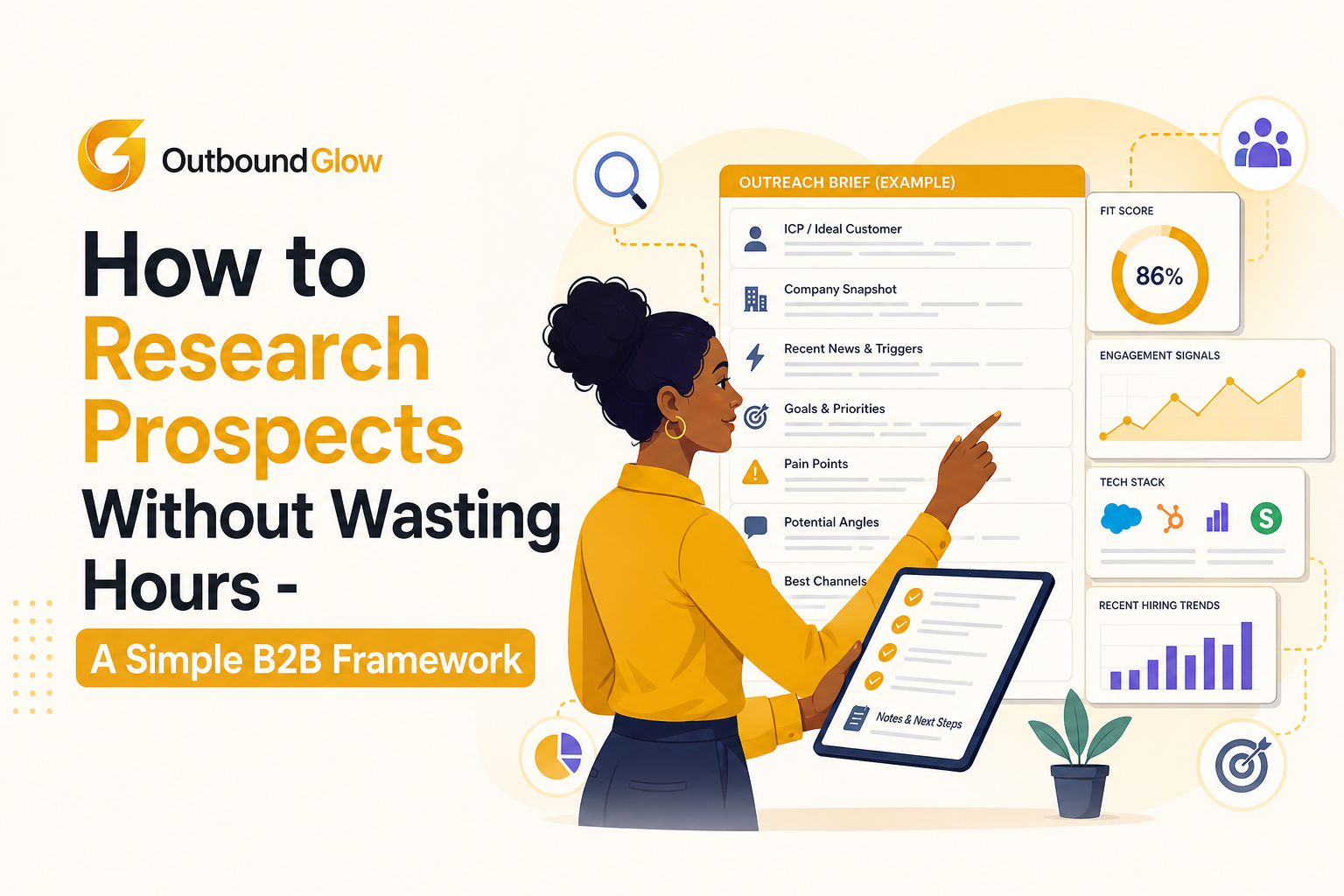
Example outreach brief fields that make prospect research reusable across a team.
The outreach brief (fields that matter)
If you want research to scale, you need a consistent brief. This makes it easy to QA, hand off, and iterate. Below is a practical structure you can implement in a spreadsheet, CRM, or outreach tool.
Outreach brief template
Account basics: company, website, location, employee range
ICP fit gates: industry (Y/N), size (Y/N), geo (Y/N), role (Y/N)
Fit score: 0 to 10 (simple sum of your scoring fields)
Trigger: hiring, funding, new leader, launch (pick one)
Trigger proof: URL or note (one line)
Hypothesis: “Because of [trigger], they likely care about [outcome].”
Message angle: deliverability, pipeline, targeting, speed-to-meeting (pick one)
Personalization context: one sentence
CTA: what you ask for (15-min chat, quick question, forward to owner)
Next step: sequence A/B, LinkedIn touch, call, or disqualify
Quality control rules (so briefs do not become fluff)
No proof, no trigger: if you cannot cite a link or a concrete note, do not use it as the hook.
One angle per sequence: avoid mixing three value props in one email.
Disqualify fast: if any hard gate is “no,” do not send. Put them in a nurture list instead.
How research connects to your outreach system
Your brief should map cleanly to the first email, follow-ups, and your measurement. If you are building a repeatable outbound motion, it helps to align research fields with how you manage sales pipeline stages, so you can see which triggers and angles produce meetings, not just replies.
Worked Example From Raw Research to a Usable Outreach Brief
Scenario
You sell a B2B product to SaaS companies and you want to reach founders or revenue leaders. Here is what “research prospects” looks like when done fast and documented.
Step 1 - Fit (60 seconds)
Company: GrowthLabs (example)
Employees: 50 to 200 (LinkedIn)
Region: US + EU
Role: Founder + Head of Revenue identified
Fit gates: industry yes, size yes, geo yes, role yes
Fit score: 8/10
Step 2 - Trigger (30 to 60 seconds)
Trigger found: hiring SDR Manager + “Outbound is a priority” in the job post
Proof: link to job post
Intent score: 2
Step 3 - Context (30 seconds)
Context: CEO posted about “scaling outbound without hurting deliverability”
Angle: list quality + inbox placement risk
Outreach brief (final)
Hypothesis: Because they are hiring outbound leadership, they care about increasing meetings while protecting deliverability.
Personalization sentence: “Saw you’re hiring an SDR Manager and called out outbound scale as a priority.”
CTA: “Worth sharing how similar teams keep bounce low while adding volume?”
What this changes in your email
Instead of “We help teams book more meetings,” you can write a message grounded in their trigger and constraints. This is the difference between generic cold outreach and outreach that earns a reply because it feels timely and specific.
Layer | What you capture | Time limit | How it shows up in outreach |
|---|---|---|---|
Fit | ICP gates + score | 60 to 120 sec | Who you contact and who you skip |
Intent | One trigger + proof | 30 to 90 sec | Your “why now” opener |
Context | Initiative or constraint | 30 to 60 sec | Your relevance line and value angle |
FAQ about researching prospects
How many prospects should I research per day?
Start with a throughput goal tied to quality: for example, 30 to 50 prospects per rep per day if you are using the 3-layer system and time-boxing. If your team cannot consistently fill fit gates, a trigger, and one context line, reduce volume until the brief quality is stable.
What if I cannot find a trigger for most accounts?
That usually means your ICP is too broad or your sources are limited. Tighten fit (industry, size, role) and add one trigger source like job posts or leadership changes. Also accept that some segments are “no trigger” and should receive lighter messaging or be deprioritized.
Is personalization always necessary?
You need relevance, not decoration. If you have a strong trigger and clear fit, minimal personalization can work. If intent is weak, context becomes more important. The goal when you research prospects is to earn the right to ask for time with a credible reason.
How do I avoid harming deliverability while scaling outreach?
Use verified contacts, keep bounce low, and monitor engagement and complaints. Time-box research so you do not compensate with spammy volume. If you want to scale safely, pair your research process with a system that protects inbox placement and list quality.
If you want to apply this framework faster, Outbound Glow helps teams operationalize it by finding ICP-matched contacts, verifying emails before they hit your list, and using AI to turn your prospect context into message-ready outreach while protecting deliverability. When your workflow makes it easy to research prospects consistently, you spend less time hunting and more time booking meetings.

Written by Leah Nguyen
Read Next
View all
ICP Targeting That Works, A Testable Framework for Higher-Quality B2B Leads
Learn icp targeting with a testable framework: hypotheses, industry rules, signals, scorecards, and outbound workflow to improve replies and pipeline quality.

Lead Database Meaning and How to Choose the Right One for B2B Sales
Learn what a lead database means, how to evaluate B2B data quality fast, and how to shortlist providers with a practical scorecard.
Prospect Research That Scales, A Signal-Based Framework for B2B Teams
Learn prospect research that scales using buying signals, scoring, and messaging inputs to prioritize accounts and personalize outreach without rabbit holes.