
Email Deliverability for Cold Email Explained in Plain English

Email deliverability is the difference between a cold email campaign that quietly prints replies and one that burns your domain while you wonder why “delivered” still means “never seen.” If your emails land in spam, Promotions, or disappear without opens, you do not need more volume, you need a clear way to diagnose what broke first. This guide explains deliverability in plain English, then gives you a simple “Deliverability Stack” you can use to pinpoint the most likely failure point and fix it in the right order.
Key takeaways
“Delivered” is not the same as “inboxed.” Inbox placement is the goal, and it depends on trust signals, not just copy.
Diagnose cold email problems using a 4-layer Deliverability Stack: identity, list quality, content, and sending behavior.
Fix the highest-impact layer first, then scale slowly with monitoring so you do not trade short-term sends for long-term domain damage.
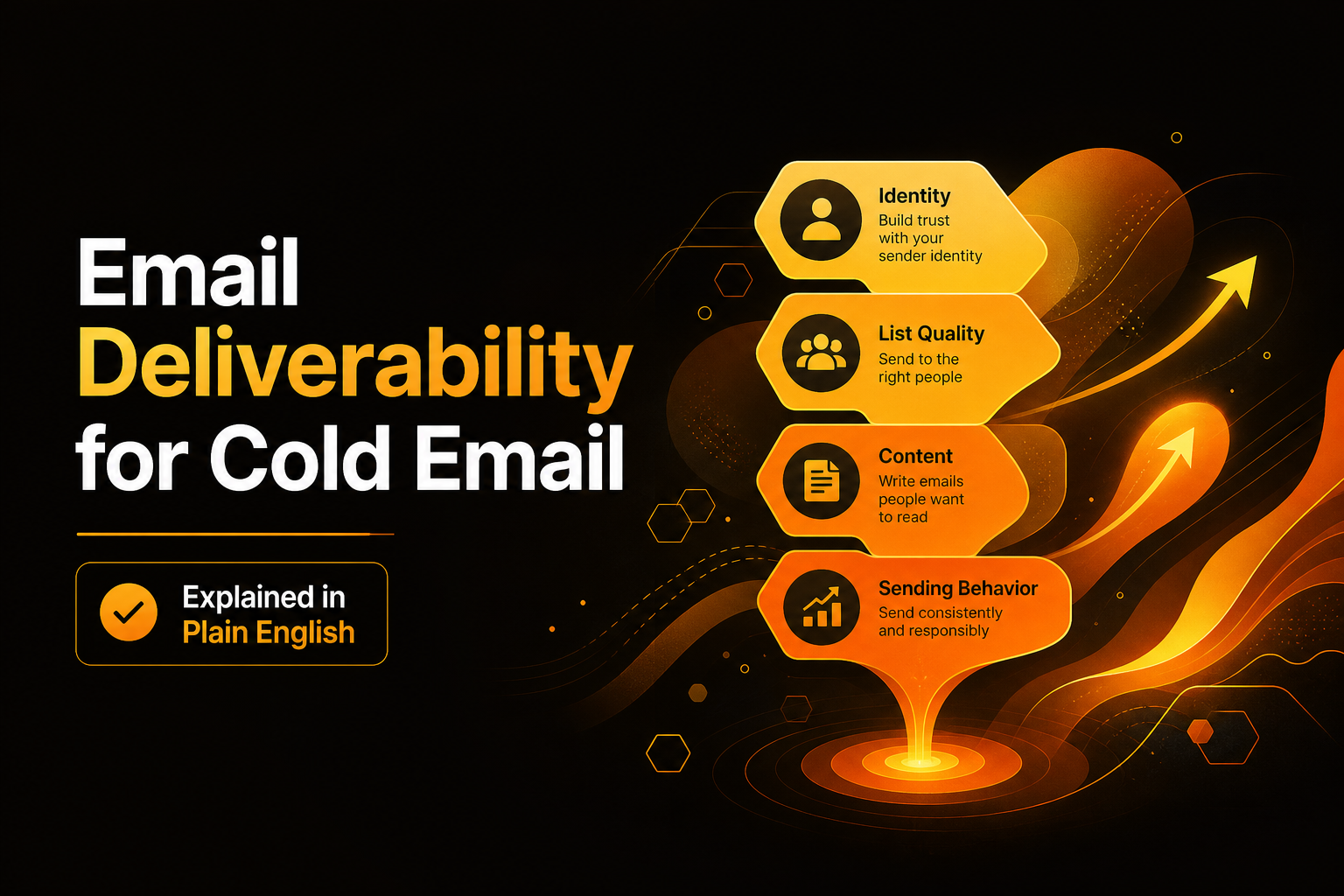
A simple deliverability stack showing identity, list quality, content, and sending behavior.
What email deliverability actually means and what it is not
Plain-English definition
Email deliverability is the ability of your emails to reach the recipient’s inbox (not spam), consistently, while maintaining a healthy sender reputation. It helps you earn placement in inbox tabs by proving to mailbox providers that your identity, list, content, and sending behavior look trustworthy.
Deliverability vs delivery
Delivery means the receiving server accepted the message (you might still land in spam or a secondary tab).
Deliverability means you land where the person will actually see it, ideally the Primary inbox.
For cold email, this distinction matters because you rarely have prior engagement history with the recipient. That means providers lean more heavily on your domain reputation, authentication, complaint signals, and list hygiene.
Inbox placement vs open rate
Open rate is an outcome metric, not a diagnostic. Privacy changes (like Apple Mail Privacy Protection) can inflate or obscure opens. Inbox placement tells you where you landed. If you only look at opens, you can miss a slow slide into spam. A better habit: measure inbox placement (where possible), bounces, spam complaints, and replies together.
Why cold email is different from newsletters
Cold email typically has:
Lower initial engagement (no prior opt-in).
Higher risk of spam complaints if targeting or messaging is off.
More sensitivity to list quality, because a small increase in hard bounces can quickly degrade reputation.
Actionable takeaway: Treat cold email deliverability like risk management. Your first goal is to protect identity and reputation before you optimize copy.
Why email deliverability matters for cold outbound
The cost of spam placement is compounding
One bad week can create a long tail of problems: fewer inbox placements lead to fewer positive engagement signals, which leads to even fewer inbox placements. This is why founders often feel like cold email “suddenly stopped working” even when their offer did not change.
Real benchmarks you should know
Spam complaint thresholds are tight. Google’s sender guidelines call out that spam rates should be kept low, and many operators treat 0.1% as a practical upper bound for cold outbound.
Bounces are a reputation signal. If you are not sure what counts as “too high,” start by learning the mechanics behind a bounce rate definition so you can separate hard bounces (bad) from soft bounces (often temporary).
Sources worth reading and bookmarking:
Google Workspace email sender guidelines (baseline expectations around authentication and spam behavior)
Actionable takeaway: Set guardrails before you scale: track spam complaint rate, hard bounce rate, and inbox placement. If any trend moves the wrong way for 3 days, pause scaling and diagnose.
The cold email deliverability stack to diagnose problems fast
The framework: 4 layers in order
Most beginners fix the wrong thing first, like rewriting copy when the real issue is authentication or list hygiene. Use this stack from bottom to top. If a lower layer is broken, upper-layer improvements will not hold.
Identity (technical trust): domain authentication, alignment, and reputation.
List quality (who you send to): validity, matching, and risk of complaints.
Content (what you send): formatting, spam triggers, and relevance signals.
Sending behavior (how you send): volume ramps, cadence, and engagement patterns.
How to use the stack in 10 minutes
If you see high hard bounces: start at List quality, then Identity.
If you see low opens but normal bounces: start at Identity and Content.
If you see spam complaints: start at List quality and Content, then Sending behavior.
If everything looks “fine” but replies drop: start at Content and targeting, then Sending behavior.
A simple diagnostic scorecard
Give each layer a quick score from 0 to 2.
0: unknown or failing (you cannot verify it or metrics are clearly bad)
1: partially set up (some signals are good, some are missing)
2: verified and stable (you can prove it with checks and metrics)
Fix the lowest score first. This avoids “random acts of optimization” and improves email deliverability with less trial and error.
Actionable takeaway: Do the scorecard before you change copy. If Identity or List quality scores 0, stop there and fix it first.
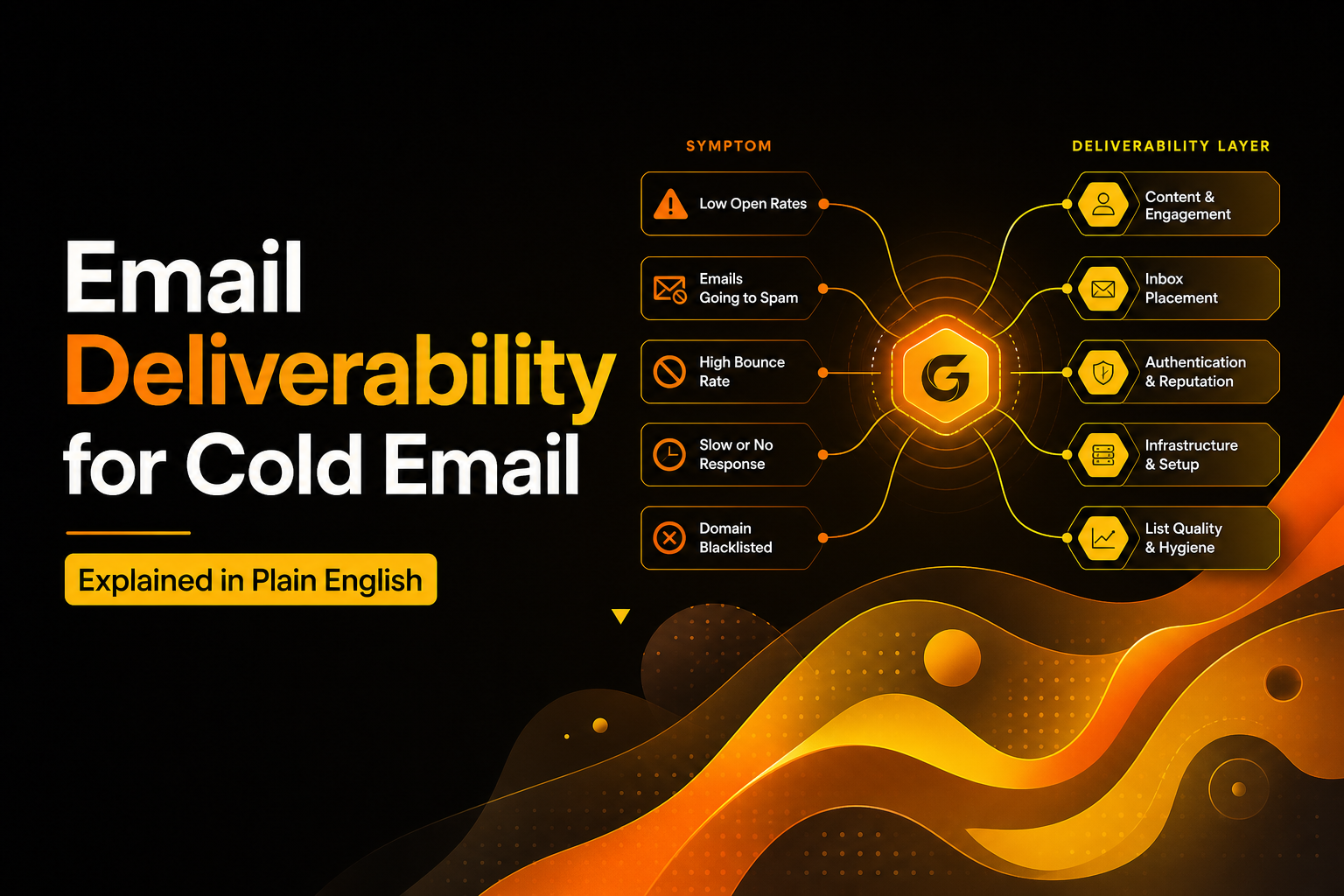
A quick diagnostic flow mapping common symptoms to the right deliverability layer.
Layer 1 Identity: authentication and domain health
Minimum technical baseline for cold email
Mailbox providers want to see that you are who you claim to be. For cold outbound, do not treat this as optional. Your baseline checks:
SPF set and passing for your sending source.
DKIM enabled and passing.
DMARC present (start with monitoring, then enforce as you mature).
Identity mistakes that tank deliverability
Sending from a domain with missing or misaligned SPF/DKIM/DMARC.
Using too many sending tools that create conflicting SPF includes.
Changing domains or inbox providers frequently, which resets trust signals.
Quick wins
Run a DNS check and confirm SPF, DKIM, DMARC all pass before you send the next sequence.
Separate cold sending from your core domain if you cannot tolerate risk, but keep branding consistent.
Warm up gradually if your domain is new or has been inactive. If you want a beginner-safe way to think about it, read email warmup.
Actionable takeaway: If you cannot prove authentication passes today, do not “test anyway.” Fix Identity first or every other change becomes noise.
Layer 2 List quality: reduce bounces and complaints before you write better copy
List quality has two parts
Validity: the address exists and can receive mail (bounce risk).
Fit: the person is a reasonable match for your message (complaint risk).
Beginner-friendly criteria for a “safe” list
Use verified emails, not scraped guesses.
Prefer role and seniority that can actually say yes to your offer.
Avoid sending to generic catch-alls unless you know how to handle them carefully.
Quick wins
Start with a small, high-fit segment of 50 to 200 contacts and validate results before scaling.
Remove any address that hard bounces immediately from all future sends.
Write down your ICP in one sentence, then build your list to match it. If you need a step-by-step workflow, see research prospects.
Actionable takeaway: If you want better email deliverability fast, cut your list size before you increase your send volume. Smaller, cleaner lists beat bigger, riskier lists.
Layer 3 Content: write for filters and humans at the same time
What filters look for (in practical terms)
Spam filters do not “read intent,” they score patterns. For cold email, the patterns that commonly hurt email deliverability include:
Overuse of salesy phrases, excessive punctuation, or all-caps.
Link-heavy emails, especially with tracking domains that look suspicious.
HTML-heavy templates that resemble mass marketing blasts.
Low relevance signals: generic intros, incorrect personalization, mismatched job titles.
A simple cold email format that stays safe
Plain text or very light formatting.
One clear reason you chose them (1 line).
One specific value statement (1 to 2 lines).
One low-friction question (yes/no or short answer).
Quick wins
Remove images, remove multiple links, and avoid attachments in first-touch cold emails.
Keep subject lines short and specific. Aim for 3 to 6 words.
Personalize based on something real, not filler. Wrong personalization can increase complaints more than no personalization.
Actionable takeaway: Before you rewrite everything, run a “minimal version” test: plain text, no links, one question. If inbox placement improves, content and formatting were part of the issue.
Layer 4 Sending behavior: volume, cadence, and automation guardrails
Why behavior matters more than people think
Mailbox providers track how you send, not just what you send. Sudden spikes, repetitive patterns, and nonstop sending to unengaged contacts can all signal automation and reduce email deliverability.
Beginner-safe sending rules
Ramp slowly: increase daily volume in small steps, not jumps.
Respect engagement: pause or stop sequences for contacts who never open or never reply after a defined number of touches.
Use consistent schedules: avoid sending huge batches at the same minute every day.
Quick wins
Set daily send caps per mailbox.
Add auto-stop rules when someone replies, bounces, or unsubscribes.
If you are using sequencing tools, make sure your approach to cold outreach automation includes ramping and safety limits, not just multi-step follow-ups.
Actionable takeaway: If you change sending behavior, change one variable at a time. For example, keep copy constant for 7 days while you adjust volume ramps so you can attribute results.
Quick wins to improve email deliverability without guesswork
Prioritized fixes by impact
Fix Identity: SPF, DKIM, DMARC passing and aligned.
Clean the list: remove risky segments, validate, and start smaller.
Simplify content: plain text, no links, one question for first touch.
Slow down sending: ramp volume, add stop rules, avoid spikes.
A 7-day “stabilize deliverability” plan
Day 1: Verify authentication and fix DNS issues.
Day 2: Segment your list into high-fit and medium-fit. Send only to high-fit.
Day 3: Send a minimal plain-text version to confirm inbox placement improves.
Day 4: Add one personalization element that is verifiably correct.
Day 5: Introduce a gentle follow-up, no new links or attachments.
Day 6: Increase daily volume by a small step, keep everything else constant.
Day 7: Review bounces, complaints, replies, and placement. Decide whether to scale or fix.
Actionable takeaway: If you want email deliverability you can trust, stabilize first, then optimize. Optimization on top of instability creates misleading results.
Checklist: the deliverability stack you can copy into your SOP
Identity checklist
SPF passes for the sending service
DKIM passes for the domain
DMARC record exists and aligns with SPF/DKIM
Consistent sending domain strategy (no frequent switching)
List quality checklist
Emails verified before upload
Hard bounces removed immediately
ICP fit documented in one sentence
High-risk segments isolated (catch-alls, unknown roles)
Content checklist
Plain text or minimal formatting
No attachments on first touch
Zero to one links max on first touch (prefer zero while diagnosing)
Personalization is factual and specific
Sending behavior checklist
Daily send caps per mailbox
Gradual ramp plan documented
Auto-stop on reply, bounce, unsubscribe
Sequence length capped (avoid endless follow-ups)
Actionable takeaway: Turn this checklist into a pre-flight review. Run it before every new campaign, not after performance drops.
The next article in the series
Email Warmup Explained and a Simple Framework to Know If You Need It
Bounce Rate Definition in Cold Email Plus the Only Breakdown That Matters
Cold Outreach Automation Without Burning Your Domain, A Beginner-Safe Framework
Email Analytics for Cold Outreach Explained With a Simple 3-Layer Framework
Symptom | Most likely layer | First thing to check | Fast fix |
|---|---|---|---|
High hard bounces | List quality | Verification method and segments | Remove risky segments, re-verify, resend to high-fit only |
“Delivered” but near-zero opens | Identity or content | SPF/DKIM/DMARC pass and alignment | Fix DNS, then test a plain-text version with no links |
Spam complaints | List quality and content | ICP fit and message relevance | Tighten targeting, remove aggressive language, reduce follow-ups |
Performance drops after scaling volume | Sending behavior | Ramp pattern and daily caps | Pause scaling, return to prior volume, ramp in smaller steps |
FAQ about cold email deliverability
What is a good email deliverability rate for cold email?
“Delivered” rates are often high even when inbox placement is poor, so focus on inbox placement and negative signals. As a safety baseline, keep hard bounces very low and spam complaints near zero, then scale only when those stay stable for several days.
Why do my cold emails say delivered but still get no opens?
Delivery only means the receiving server accepted the message. You can still land in spam or a secondary tab due to weak authentication, low domain reputation, or content patterns that filters dislike. Start by confirming SPF, DKIM, and DMARC pass, then test a plain-text email with no links.
Do I need warm-up to improve email deliverability?
Warm-up can help when a domain or mailbox has little sending history or after a reputation hit, but it cannot fix bad lists or spammy content. Use the Deliverability Stack: if Identity is weak, warm-up may help; if List quality is weak, warm-up will not save you.
How many links should a cold email include?
When diagnosing deliverability, use zero links on the first touch to reduce risk and isolate variables. Once placement is stable, add at most one relevant link and keep the rest of the email plain and specific.
If you want to protect email deliverability while scaling outbound, Outbound Glow helps you monitor domain health signals, validate DNS setup, and keep sending behavior within safe guardrails so you can focus on targeting and messaging. You can explore it with a free trial and use the Deliverability Stack above to guide what to fix first.

Written by Leah Nguyen

Standard Email Open Rates, The Only Benchmark Framework That Explains the Conflicting Numbers
Learn what standard email open rates mean in 2026, why benchmarks conflict, and how to pick the right range using CTR and CTOR.

Improve Email Deliverability for Cold Outreach With a Weekly System That Protects Domain Health
Improve email deliverability for cold outreach with a weekly scorecard, ramp plan, and safe personalization to protect domain health.

Test Domain Health Before Scaling Cold Email With a 72-Hour Micro-Send Protocol
Learn how to test domain health before scaling cold email using a 72-hour micro-send protocol, go/no-go thresholds, and fix paths.